
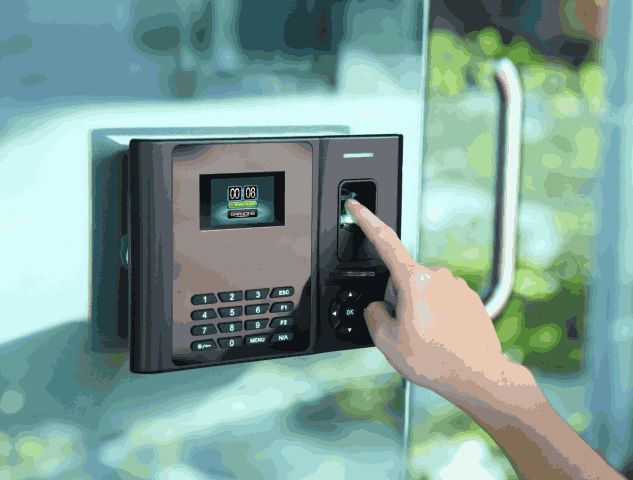
Accurate attendance records affect payroll, staffing, productivity, and employee trust. Yet many organizations still rely on paper registers, spreadsheets, swipe cards, or handwritten timesheets. These methods create costly gaps. Employees can sign in for one another, records can be changed, and payroll teams may spend hours checking missing entries.
A biometric attendance system replaces guesswork with automated identity verification. It records when an authorized person enters, leaves, or starts a shift by checking a unique physical feature. This guide explains how the technology works, which options are available in 2026, what features matter, and how to introduce it without creating privacy or payroll problems.
What Is a Biometric Attendance System?
A biometric attendance system is a digital time-tracking solution that identifies a person through a measurable physical characteristic. Common choices include fingerprints, facial features, iris patterns, palm shapes, and vein patterns.
During setup, the system converts the selected characteristic into a mathematical template. When the employee checks in or out, a live scan is compared with that template. A successful match creates a time-stamped attendance entry.
This differs from cards, PINs, and registers. A card can be borrowed, a PIN can be shared, and a signature can be copied. Biometric verification connects the attendance event to the enrolled person, making fraudulent clock-ins more difficult.
How Biometric Attendance Works
A biometric attendance system usually follows five steps.
First, an administrator enrols each employee. The device captures a fingerprint, face, iris, or palm scan and creates a protected digital template.
Second, the employee presents the same feature when arriving, leaving, or taking a recorded break.
Third, the software compares the live scan with the enrolled template. Better facial systems may use liveness checks to detect printed photos, screen replays, or other spoofing attempts.
Fourth, the platform records the employee ID, date, time, device, and location. Managers can view late arrivals, missed punches, overtime, and shift status.
Finally, the data moves into attendance, HR, or payroll software. Cloud-connected devices can sync in real time. Offline devices store records locally and upload them when the connection returns.
Types of Biometric Attendance Technologies
Fingerprint Recognition
A fingerprint attendance system is affordable, fast, and familiar. It suits offices, schools, shops, and many small businesses. Worn fingerprints, dust, moisture, gloves, or manual work can reduce scan quality.
Facial Recognition
Facial recognition offers contactless check-in and can serve busy entrances quickly. In 2026, buyers should look for liveness detection, adjustable matching thresholds, and independent performance evidence instead of trusting claims such as “100% accurate.”
Iris Recognition
Iris scanning studies the pattern around the pupil. It can provide strong accuracy in controlled, high-security environments. The equipment may cost more and requires careful positioning.
Palm and Vein Recognition
Palm systems examine hand shape, surface patterns, or veins below the skin. Vein recognition is difficult to copy and can suit sites requiring stronger identity assurance. Cost, availability, and user training should be reviewed first.
Essential Features to Look For
The best biometric attendance system is not always the device with the longest feature list. It is the one that fits the organization’s shifts, locations, payroll rules, and support needs.
Look for fast matching, real-time dashboards, shift scheduling, overtime rules, leave tracking, holiday calendars, and alerts for late arrival or early departure. Reports should be easy to filter by employee, team, branch, date, and shift.
The software should connect with payroll or HR tools without repeated data entry. Mobile access helps managers approve corrections away from the office. Multi-location support matters for chains, campuses, warehouses, and branch networks.
Security controls should include administrator roles, audit logs, encryption, backups, retention settings, and a clear method for deleting former employees’ templates. Facial systems should also be tested under weak lighting, glasses, masks, and different camera angles.
Major Benefits for Businesses
A well-planned biometric attendance system can reduce buddy punching, shared cards, and false attendance entries. Each event is tied to an enrolled person, giving HR teams a more reliable record.
Automation cuts administrative work. Instead of collecting registers or combining spreadsheets, teams can review exceptions such as missing punches, lateness, absence, and overtime from one dashboard. This saves payroll time and lowers the risk of salary disputes caused by manual calculations.
Managers also see staffing patterns more clearly. They can compare scheduled hours with actual hours, identify repeated lateness, and plan coverage during busy periods. Central reports help leaders monitor several branches without calling each location.
Transparent records can support fairness too. Employees can review their hours, request corrections, and understand how overtime or deductions were calculated. Reliable data also supports workforce planning and performance discussions.
Applications Across Different Sectors
A biometric attendance system can be adapted to many working environments.
Corporate offices use it to track start times, breaks, flexible shifts, and overtime. Schools and educational institutions may record teachers, administrative staff, and students through separate rules.
Factories and warehouses need fast processing for large shift changes, offline operation, and durable devices. Hospitals use attendance tools for doctors, nurses, technicians, and support teams across rotating schedules.
Retail stores and shopping centres benefit from branch dashboards and centralized payroll data. Construction and field operations may combine portable devices or approved mobile check-ins with location controls, where legally appropriate.
Integration With HR and Payroll Software
A biometric attendance system delivers more value when it connects directly with HR and payroll workflows. Approved records can feed salary calculations, overtime, unpaid leave, lateness deductions, allowances, and shift differentials.
This removes duplicate data entry and reduces typing errors. It can also link attendance with leave balances, schedules, department reports, and performance records.
Before purchase, ask the provider to demonstrate the process using your actual policies. Test overnight shifts, weekends, public holidays, grace periods, breaks, missing punches, and staff working across locations. A smooth sales demo does not prove that complex payroll rules will work correctly.
Privacy and Data-Security Considerations
A biometric attendance system handles sensitive identity data, so privacy must be designed from the start. The organization should document why the technology is needed, what is collected, where it is stored, who can access it, and when it will be deleted.
Secure platforms use protected templates instead of keeping unnecessary raw images. Access should follow job roles, and administrator actions should be logged. Encryption, secure servers, backups, breach procedures, and vendor reviews are basic requirements.
Employees need a plain-language notice before enrolment. It should explain the purpose, retention period, rights, complaint route, and any alternative required by law. Consent alone may not solve every workplace privacy issue, so local employment and data-protection rules must be checked.
How to Choose the Best Biometric Attendance System
Start with the workforce, not the hardware. Count employees, locations, entry points, shifts, and peak check-in volume. A small office may need one terminal, while a retail chain may require cloud management, branch permissions, and centralized payroll.
Choose the right method. Fingerprints may suit an office but perform poorly for workers with worn fingertips. Facial recognition may offer faster contactless entry but needs good lighting, liveness controls, and fair testing across the actual workforce.
Ask vendors to run a pilot. Measure match speed, false rejections, network recovery, report accuracy, and payroll results. Check whether genuine errors can be corrected without altering raw logs.
Review installation, training, warranties, updates, technical support, data export, backups, and contract exit terms. The best biometric attendance system should scale with future locations and allow the business to retrieve its records if it changes provider.
Common Implementation Mistakes to Avoid
Choosing only by price is a common mistake. A cheap device becomes expensive when software, support, or payroll integration fails.
Do not skip a pilot or place terminals in bright sunlight, dusty corners, crowded walkways, or areas with weak connectivity. Train administrators and employees before launch.
Avoid collecting more data than needed. Set retention rules, test backups, review permissions, and create a fair process for failed scans. Most importantly, confirm local privacy and employment requirements before enrolment.
Building a Smarter Attendance Process in 2026
A biometric attendance system should support a clear attendance policy, not act as a stand-alone control tool. Define working hours, grace periods, overtime approval, breaks, remote work, field attendance, corrections, and dispute handling before configuring the software.
In practical attendance projects, payroll accuracy depends as much on clear rules as it does on hardware. Start with a limited group, compare records with real schedules, fix exceptions, and then expand. This phased approach builds trust and stops small setup errors from affecting everyone.
Conclusion
The right biometric attendance system can improve record accuracy, reduce buddy punching, simplify payroll, and give managers a clearer view of workforce activity. Strong results depend on careful selection, secure data handling, software compatibility, and employee communication.
Evaluate attendance problems first. Then compare technologies, test real payroll rules, and review privacy duties. A solution built around actual business needs will deliver more value than a device selected only for price or headline features.
Ready to modernize workforce tracking? Request an EduSuite demo and compare the platform with your shift, reporting, security, and payroll requirements.
Frequently Asked Questions
1. What is the main purpose of biometric attendance?
It confirms who is checking in or out and creates an accurate, time-stamped record for shifts, attendance, and payroll.
2. Is fingerprint or facial recognition better?
Fingerprint devices are often cheaper and familiar. Facial recognition is contactless and may be faster at busy entrances. The right choice depends on the workplace, environment, privacy rules, workforce, and budget.
3. Can it work without the internet?
Yes. Many devices can record entries offline and synchronize them later. Check storage capacity, sync rules, and how delayed or duplicate records are handled.
4. Can it connect with payroll software?
Yes, when the device and platform support an API, direct integration, or reliable data export. Test every payroll rule before full deployment.
5. Is biometric attendance data secure?
It can be secure when protected templates, encryption, access controls, audit logs, backups, and retention rules are used. Security still depends on the vendor, configuration, and staff practices.