
Businesses handle sensitive information every day. From employee records and customer documents to invoices, contracts, financial paperwork, and internal reports, offices often produce large amounts of paper that should not simply be thrown into a regular waste bin.
A reliable shredder can help businesses destroy unwanted documents efficiently while reducing the risk of sensitive information being exposed.
However, choosing an office shredder is different from choosing a machine for occasional household use. Businesses need to consider document volume, security requirements, sheet capacity, operating time, waste-bin size, feeding method, and maintenance.
This guide explains what businesses should look for when choosing a paper shredder for office use and how to match a machine to their daily workload.
Why Do Offices Need a Paper Shredder?
Offices generate documents containing information that may become unnecessary after a certain period.
Examples include:
- Customer records
- Employee paperwork
- Financial documents
- Invoices
- Receipts
- Internal reports
- Draft contracts
- Printed emails
- Business correspondence
- Confidential notes
- Outdated forms
- Documents containing personal information
Throwing such paperwork directly into ordinary trash can create unnecessary information-security risks.
A shredder provides a straightforward way to destroy documents before disposal.
For businesses, document destruction should also be considered alongside their internal data-protection, retention, and disposal policies.
What Is the Best Type of Paper Shredder for an Office?
There is no single shredder that is best for every office.
The right machine depends on:
- Number of employees
- Daily paper volume
- Document sensitivity
- Frequency of use
- Available workspace
- Budget
- Required security level
For many offices, cross-cut shredders offer a practical balance between document security and performance.
For highly sensitive documents, businesses may consider micro-cut shredders that produce significantly smaller particles.
Cross-Cut vs Micro-Cut for Offices
The cutting method should be selected according to the sensitivity of the documents.
Cross-Cut
Cross-cut machines cut paper in multiple directions and produce smaller particles than traditional strip-cut shredders.
They can be suitable for:
- General confidential documents
- Customer paperwork
- Financial documents
- Internal business records
- Employee information
Micro-Cut
Micro-cut machines produce much smaller particles.
They may be appropriate when an organization needs a higher level of document destruction.
Potential applications include:
- Highly confidential business information
- Sensitive customer records
- Financial information
- Proprietary information
- Documents subject to stricter security requirements
Businesses should check the manufacturer’s stated security rating and particle size rather than choosing a machine solely based on the term “micro-cut.”
What Should Businesses Consider Before Buying?
Before purchasing a paper shredder, identify your actual office requirements.
Ask:
How much paper do we shred?
A small office may process a few hundred sheets a week, while a larger organization may generate thousands.
How sensitive are the documents?
The more sensitive the information, the more important the security level becomes.
How frequently will the machine run?
A machine designed for occasional use may not be suitable for continuous office workloads.
Who will use it?
If multiple employees use the machine, ease of operation and capacity become more important.
Where will it be placed?
Available workspace can determine the appropriate machine size.
These questions can help narrow down the right type of machine.
Sheet Capacity Matters in an Office
Sheet capacity refers to the number of sheets a machine can process in a single pass under specified conditions.
For occasional users, manually inserting small batches may not be a problem.
But in a busy office, constantly counting and feeding a few sheets at a time can reduce productivity.
Higher-capacity models can process larger stacks, depending on their specifications.
Keep in mind that actual performance can vary depending on:
- Paper thickness
- Paper size
- Folded documents
- Staples
- Moisture
- Machine condition
Never exceed the manufacturer’s recommended capacity.
Manual-Feed vs Automatic-Feed Shredders
The feeding system can make a major difference in an office environment.
Manual-Feed Shredder
With manual feeding, employees insert documents directly into the feed opening.
This works well when:
- Shredding is occasional
- Document batches are small
- Only one or two people regularly use the machine
Automatic-Feed Shredder
Automatic-feed machines allow users to load a specified quantity of documents into a dedicated compartment.
The machine then feeds the papers automatically.
This can be useful for offices that regularly need to destroy large batches of documents.
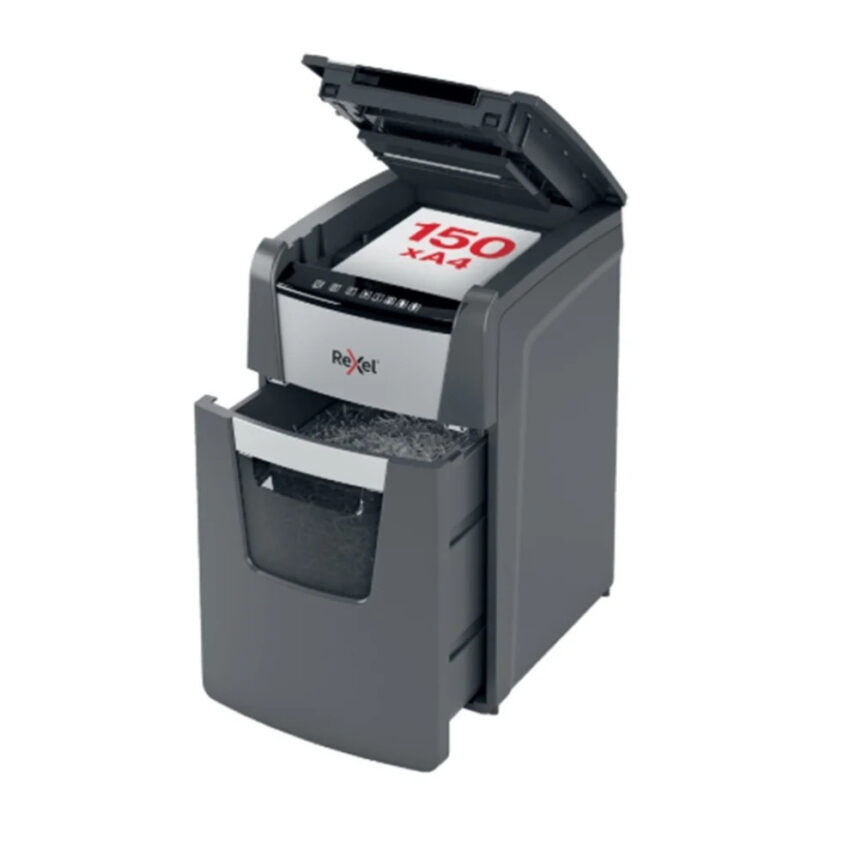
Toyzinn’s current Shredders collection includes Rexel Optimum AutoFeed+ models with different automatic-feed capacities, giving businesses options depending on their workload.
How Important Is the Duty Cycle?
The duty cycle is especially important for office shredders.
It describes how long the machine can operate before it needs to cool down.
For example, a machine intended for occasional household use may not be designed to operate continuously throughout an office day.
If several employees will use the same machine, look for a model with an operating cycle appropriate for your expected workload.
A longer duty cycle can reduce interruptions during large shredding sessions.
What Happens If an Office Shredder Overheats?
Continuous shredding generates heat inside the motor and cutting mechanism.
If the machine becomes too hot, thermal protection may cause it to stop temporarily.
Overheating can be caused by:
- Excessive continuous operation
- Processing large document batches
- Exceeding the recommended sheet capacity
- Insufficient cooling periods
Allow the machine to cool according to the manufacturer’s instructions before continuing.
For high-volume offices, choosing a machine designed for heavier workloads can reduce the likelihood of frequent interruptions.
Why Is Bin Capacity Important?
The waste bin collects shredded documents.
In an office environment, a small bin can fill quickly.
A larger bin can reduce the number of times employees need to stop and empty the machine.
Consider a larger waste capacity if:
- Multiple employees use the machine.
- The office regularly destroys large document batches.
- The shredder is used throughout the working day.
Some models include full-bin indicators or viewing windows that make it easier to know when emptying is required.
How Secure Should an Office Shredder Be?
Security should be based on the information being destroyed.
Not every piece of paper requires the same level of destruction.
General Documents
Low-sensitivity paperwork may not require advanced shredding.
Confidential Documents
Customer information, internal reports, and financial paperwork generally require greater care.
A cross-cut machine can provide stronger destruction than strip-cut shredding.
Highly Sensitive Documents
Highly confidential information may justify a micro-cut machine or another destruction method that meets the organization’s security requirements.
Businesses should establish document-classification rules so employees know which documents require which level of destruction.
Understanding P-Level Security
Paper shredders may be described using security levels such as P-4 or P-5.
These classifications relate to paper destruction under DIN 66399.
In general, higher P-levels correspond to smaller particle sizes and stronger destruction requirements.
The appropriate level depends on the sensitivity of the information.
Businesses should verify the specific machine’s security classification and particle dimensions before making a purchasing decision.
What Documents Should Offices Shred?
A business should have clear policies regarding which documents need to be destroyed.
Potential examples include:
- Customer personal information
- Employee records
- Payroll documents
- Bank information
- Financial statements
- Credit information
- Contracts
- Confidential proposals
- Internal reports
- Business plans
- Documents containing passwords or account details
- Unused documents containing personal data
Not every document needs to be shredded immediately.
Organizations should follow appropriate document-retention schedules before destroying records.
Should Offices Shred Every Document?
No.
A shredder should not replace a proper document-retention policy.
Businesses may be legally or operationally required to retain certain records for specific periods.
A sensible document-disposal process should identify:
- What documents must be retained.
- How long they must be retained.
- Which documents can be securely destroyed.
- Which destruction method is appropriate.
This helps prevent both premature document destruction and unnecessary storage.
How Fast Should an Office Shredder Be?
Shredding speed can influence productivity, particularly in busy workplaces.
However, speed should not be considered independently.
Compare:
- Sheets per minute
- Sheets per pass
- Continuous runtime
- Automatic-feed capacity
- Recovery time after overheating
A very fast machine with a small bin or short operating cycle may not necessarily be the most efficient option for a busy office.
What Is the Right Shredder Size for a Small Office?
A small office may not need a large commercial machine.
For a small team, consider:
- Suitable cross-cut security
- Moderate sheet capacity
- Reasonable bin size
- Appropriate duty cycle
- Compact dimensions
If the office regularly handles sensitive documents, security should remain a priority even when choosing a compact machine.
What Is the Right Shredder for a Large Office?
Large offices generally need machines capable of handling higher document volumes.
Important features may include:
- High sheet capacity
- Large waste bin
- Longer duty cycle
- Automatic feeding
- High shredding speed
- Jam protection
- Overload protection
- Higher security level
The number of employees sharing the machine should also be considered.
One shredder serving an entire department may need significantly greater capacity than a machine used by a single employee.
Should You Put a Shredder in Every Department?
It depends on the organization.
A centralized shredder may be sufficient for a small office.
Larger organizations may benefit from placing machines closer to departments that regularly handle confidential documents.
For example:
- Human resources
- Finance
- Legal
- Administration
- Customer service
A decentralized approach can reduce the need for employees to transport sensitive paperwork around the workplace.
However, the organization should still maintain consistent document-destruction policies.
Office Shredder Safety
Workplace shredders should be used according to the manufacturer’s safety instructions.
Employees should:
- Keep hands away from the feed opening.
- Keep loose clothing away from moving components.
- Keep hair and jewelry away from the machine.
- Avoid inserting unapproved materials.
- Never exceed the sheet limit.
- Turn the machine off before attempting maintenance.
- Keep children and unauthorized users away from the machine.
- Follow instructions for clearing jams.
Employees should receive basic training if the machine is shared across the office.
How to Prevent Office Shredder Jams
Jams can interrupt productivity.
To reduce the risk:
Do Not Overload the Feed
Stay within the manufacturer’s sheet capacity.
Prepare Documents
Remove unnecessary folds and materials that the machine does not support.
Follow Material Restrictions
Some shredders can process staples or paper clips, while others cannot.
Empty the Bin
An overfilled bin can interfere with normal operation.
Maintain the Machine
Follow the manufacturer’s cleaning and lubrication instructions.
How to Maintain an Office Shredder
A regular maintenance routine can help keep the machine performing properly.
Depending on the model, maintenance may include:
- Emptying the waste bin
- Cleaning paper dust
- Lubricating the cutting mechanism
- Checking the feed opening
- Clearing paper debris
- Following recommended service intervals
Heavy-use office shredders may require more frequent maintenance than machines used occasionally at home.
Always follow the manufacturer’s instructions for your particular model.
Should You Buy One Large Shredder or Several Smaller Ones?
This depends on your office structure.
One Centralized Machine
Advantages can include:
- Lower equipment cost
- Centralized maintenance
- Easier monitoring
Disadvantages may include:
- Employees must travel to the machine.
- Queues can develop during busy periods.
- Sensitive documents may need to be transported.
Several Smaller Machines
Advantages can include:
- Convenient access
- Less waiting
- Department-specific use
- Reduced movement of confidential documents
Disadvantages may include:
- Higher equipment costs
- More maintenance
- More waste bins to empty
The right approach depends on the size and structure of the business.
Common Mistakes When Buying an Office Shredder
1. Buying Based Only on Price
The cheapest machine may not handle your workload.
2. Ignoring Document Sensitivity
A basic shredder may not provide the destruction level required for confidential information.
3. Underestimating Paper Volume
A low-capacity machine can become frustrating in a busy office.
4. Ignoring Duty Cycle
A machine may have a high sheet capacity but still require frequent cooling.
5. Choosing the Wrong Bin Size
A small bin can require constant emptying.
6. Forgetting Maintenance
Cutting mechanisms require appropriate care to maintain performance.
7. Assuming All Shredders Are the Same
Different models can vary significantly in speed, capacity, security, and operating cycle.
How to Choose an Office Shredder Step by Step
Use the following process before purchasing.
Step 1: Identify Your Document Types
Determine what information your business regularly destroys.
Step 2: Estimate Your Paper Volume
Calculate how much paperwork you typically shred per week.
Step 3: Select the Security Level
Choose an appropriate cutting method and security rating.
Step 4: Determine the Feed Requirement
Decide whether manual or automatic feeding is more suitable.
Step 5: Check the Duty Cycle
Make sure the machine can handle your expected operating time.
Step 6: Choose the Bin Capacity
Consider how frequently you want to empty the waste bin.
Step 7: Check Material Compatibility
Confirm whether the machine can handle staples, paper clips, cards, or other materials you may need to destroy.
Step 8: Consider Workspace
Make sure the machine fits comfortably in the intended location.
Office Shredder Comparison Checklist
|
Feature |
Occasional Office Use |
Regular Office Use |
High-Volume Office |
|
Cutting type |
Cross-cut |
Cross-cut |
Cross-cut/Micro-cut |
|
Sheet capacity |
Moderate |
Higher |
High |
|
Bin size |
Small/medium |
Medium/large |
Large |
|
Duty cycle |
Short/moderate |
Moderate/long |
Long |
|
Automatic feed |
Optional |
Useful |
Highly useful |
|
Security |
Appropriate to documents |
Higher security |
High security where required |
|
Speed |
Moderate |
Higher |
High |
|
Maintenance |
Basic |
Regular |
More frequent |
These are general guidelines. Always compare the exact specifications of individual machines.
When Should a Business Upgrade Its Shredder?
An office may need a new machine when:
- The current shredder frequently overheats.
- Employees regularly exceed its capacity.
- Paper jams occur often.
- The bin is too small.
- The machine cannot handle the office’s document volume.
- The security level is no longer appropriate.
- The office has expanded.
- Employees spend too much time waiting for the machine.
Upgrading should be based on actual operational needs rather than simply buying the newest model.
Final Thoughts
The best office shredder is not necessarily the largest or most expensive machine.
The right choice depends on document sensitivity, paper volume, frequency of use, security requirements, and workplace setup.
For many businesses, a cross-cut machine can provide a useful balance between security and everyday performance. Offices handling highly sensitive information may consider micro-cut models with an appropriate security classification.
High-volume workplaces should pay particular attention to sheet capacity, duty cycle, shredding speed, automatic feeding, and waste-bin capacity.
A well-selected paper shredder machine can make document disposal more efficient while supporting a broader information-security process.
Before buying, assess your actual workload, identify the documents you need to destroy, and compare machines based on their specifications rather than price alone.
For businesses and households looking for other products beyond office equipment, including toys near me, Toyzinn provides a broad range of products across different categories.
Frequently Asked Questions
1. What is the best paper shredder for office use?
The best office shredder depends on document sensitivity, workload, number of users, and required security level. Cross-cut models are suitable for many offices, while micro-cut machines can be considered for highly sensitive information.
2. How powerful should an office shredder be?
An office shredder should be capable of handling the organization’s normal paper volume without regularly exceeding its sheet capacity or duty cycle.
3. Is cross-cut enough for office documents?
Cross-cut can be appropriate for many confidential business documents. However, organizations handling highly sensitive information may require a higher security level.
4. What is the difference between an office and home shredder?
Office shredders are generally selected based on higher workloads, longer operating cycles, larger bins, and potentially higher sheet capacities. Home shredders may be designed for lighter use.
5. Are automatic-feed shredders good for offices?
Yes. Automatic-feed shredders can be particularly useful for offices that regularly process large batches of documents because they reduce the need for continuous manual feeding.
6. How often should an office shredder be emptied?
It depends on the bin capacity and amount of paper being shredded. Empty the bin according to the manufacturer’s recommendations and avoid allowing it to become excessively full.
7. How long can an office shredder run continuously?
The continuous operating time varies by model. Check the manufacturer’s duty-cycle specification before purchasing.
8. Why does an office shredder overheat?
Extended operation, excessive paper volume, overloading, and insufficient cooling time can contribute to overheating. Follow the machine’s recommended operating cycle.
9. Can office shredders handle staples?
Some models are designed to process staples, while others may not be. Always check the manufacturer’s specifications before shredding documents containing staples.